
Warehouse Operations Simplified

Inventory Management

When Do You Need Location-Managed Warehousing?
Knowledge Series

When Do You Need Location-Managed Warehousing?

Every Warehouse Starts Simple In the beginning, warehouse management feels easy. You know what stock you have, where it is kept, and what needs to be dispatched. A spreadsheet, a few labels, and some experience are often enough. But warehouses rarely stay simple. As the number of products, storage areas, orders, batches, and people increases, relying on memory and spreadsheets becomes harder to manage. The real question is not: “How big is your warehouse?” It is: “How complex is your warehouse?” 7 Signs You’ve Outgrown Basic Warehousing 1. You’re Managing Around 2,000+ Stock Keeping Units With thousands of Stock Keeping Units, remembering exactly where every product is stored becomes difficult. Even a small mistake in location can turn picking into a search exercise. 2. You Have Multiple Warehouses or Storage Zones When inventory is spread across warehouses, racks, zones, or temperature-controlled areas, simply knowing that stock exists is no longer enough. You need to know exactly where it exists. 3. You Handle Multiple Pack Sizes The same product may exist as a carton, box, or individual piece. Without proper location and inventory management, quantities can easily become confusing, leading to incorrect picking and stock counts. 4. You Need Batch or Serial Number Tracking When products need to be tracked by batch or serial number, the warehouse must know more than the product name. It needs to know which specific stock is where. This becomes especially important for industries dealing with expiry dates, recalls, warranties, or compliance requirements. 5. Multiple People Pick Orders at the Same Time When several warehouse operators are picking simultaneously, relying on verbal instructions or memory creates confusion. Location management gives each picker a clear path to the required inventory. 6. Your Daily Order Volume Is Increasing More orders mean more movements. As picking frequency increases, even small inefficiencies can multiply into significant delays. A structured location system helps teams find and move inventory faster. 7. Stock Mismatches Are Becoming Frequent If the system says stock is available but the warehouse team cannot find it, something is wrong. Frequent stock mismatches can indicate that inventory is being moved without accurate location updates. At that point, spreadsheets and memory are no longer enough. So, What Does Location Management Actually Solve? Location-managed warehousing creates a digital map of your inventory. Instead of simply knowing: “We have 500 units of Product A.” You can know: “Product A — Batch 1024 — 200 units — Rack A3, Bin 04.” This makes it easier to: The Rule of Thumb You don’t need location management simply because you have a large warehouse. And you don’t necessarily need it because you have a small warehouse. You need it when warehouse complexity crosses the point where people can no longer reliably track inventory using memory, spreadsheets, and manual processes. A compact warehouse with 5,000 Stock Keeping Units and multiple picking teams may be more complex than a much larger warehouse handling 500 simple products. Complexity, Not Warehouse Size, Determines the Need. The question is no longer: “Is my warehouse big enough for a Warehouse Management System?” Ask instead: “Is my warehouse complex enough that manual tracking is slowing us down?” If the answer is yes, location-managed warehousing may be the next step. Could your warehouse still scale without location management? If inventory is getting harder to find, track, and control, it may be time to rethink how your warehouse manages locations.

Barcode Is Not Warehouse Management
Blogs

Barcode Is Not Warehouse Management

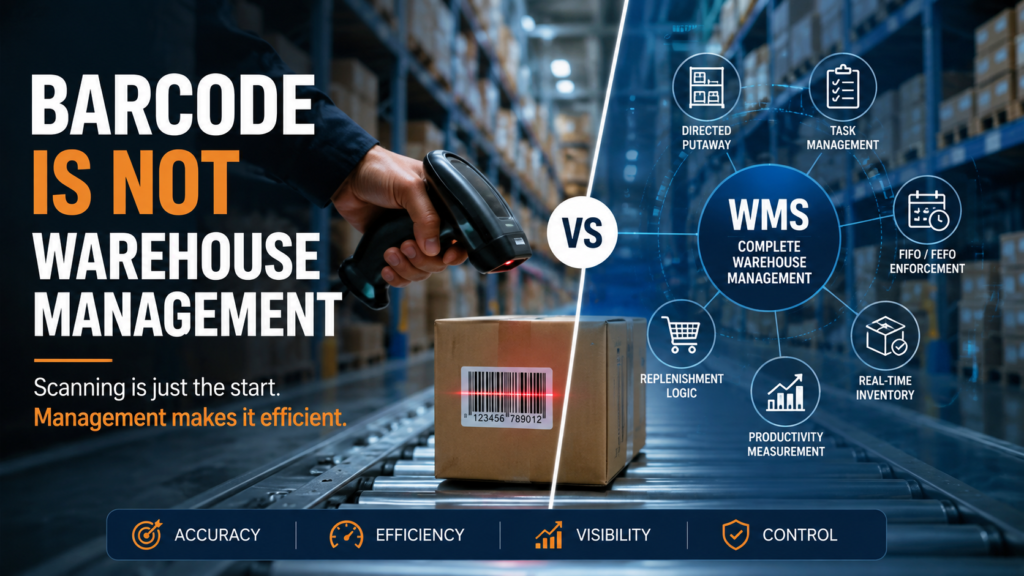
Many businesses proudly say: “We use barcode scanners, so we have warehouse management.” Unfortunately, that’s one of the biggest misconceptions in modern warehousing. Barcode scanning is an important tool, but it is only one feature of a Warehouse Management System (WMS). A barcode helps identify products. A WMS manages your entire warehouse operation—from receiving goods to dispatching orders. If your warehouse only scans products, you’re missing the capabilities that actually improve accuracy, speed, and profitability. What Is a Barcode System? A barcode system simply captures product information by scanning a printed barcode. Typically, businesses use barcode scanners to: While this is useful, barcode scanning alone doesn’t tell your warehouse what should happen next. That’s where Warehouse Management Systems come in. What Is Warehouse Management System (WMS)? A Warehouse Management System is software that plans, controls, and optimizes every warehouse process in real time. Instead of simply recording movements, a WMS makes operational decisions that improve efficiency, reduce errors, and increase productivity. Think of it this way: The barcode sees the product. The WMS decides what to do with it. 1. Directed Putaway Without a WMS, operators usually place incoming inventory wherever they find space. A Warehouse Management System automatically recommends the best storage location based on: This reduces travel time and improves picking efficiency. 2. Task Management Many warehouses still rely on supervisors giving verbal instructions. A WMS automatically creates and assigns tasks such as: Employees know exactly what to do next, improving labor utilization and reducing idle time. 3. FIFO Enforcement FIFO (First In, First Out) ensures older inventory is shipped before newer inventory. Without automation: A Warehouse Management System automatically directs workers to pick the oldest eligible stock. 4. FEFO Enforcement For industries like food, pharmaceuticals, cosmetics, and chemicals, FEFO (First Expired, First Out) is even more important than FIFO. A WMS tracks: It automatically ensures products nearing expiration are dispatched first, reducing waste and compliance risks. 5. Real-Time Inventory Visibility Many companies only discover inventory problems during monthly stock counts. A Warehouse Management System updates inventory instantly after every transaction. This provides: Real-time visibility enables better planning and faster decision-making. 6. Productivity Measurement Can you answer these questions? Most barcode systems cannot answer these questions. A Warehouse Management System tracks operational performance using KPIs such as: These insights help managers continuously improve warehouse performance. 7. Replenishment Logic Fast-moving products often run out in picking locations even when reserve stock is available. Without a WMS: A Warehouse Management System automatically generates replenishment tasks before stock runs out, ensuring pick locations remain stocked throughout the day. Barcode Scanning Records Events. WMS Controls Operations. This difference is critical. A barcode scanner records that an item moved. A Warehouse Management System decides: That’s the difference between tracking inventory and managing a warehouse. Signs You Need More Than Barcode Scanning If your warehouse experiences any of these issues, barcode scanning alone may not be enough: A Warehouse Management System addresses these challenges through automation, standardized workflows, and real-time control. Frequently Asked Questions Is barcode scanning the same as a Warehouse Management System? No. Barcode scanning is only a data capture method. A Warehouse Management System uses barcode data to automate warehouse operations, optimize workflows, and improve inventory accuracy. Can a warehouse operate with only barcode scanners? Yes, but operations remain largely manual. Barcode scanners improve data entry accuracy, while a Warehouse Management System manages receiving, putaway, picking, replenishment, inventory tracking, and labor management. Does every warehouse need a Warehouse Management System? Small warehouses may initially manage with basic barcode systems. However, as inventory, order volumes, and operational complexity grow, a Warehouse Management System becomes essential for maintaining efficiency and accuracy. What industries benefit most from WMS? Industries including e-commerce, retail, manufacturing, automotive, pharmaceuticals, food & beverage, third-party logistics (3PL), and distribution centers benefit significantly from Warehouse Management Systems. Final Thoughts Using barcode scanners is a good first step—but it is not the same as having a Warehouse Management System. If your warehouse still depends on manual decisions after scanning, you’re only capturing data—not optimizing operations. A modern Warehouse Management System transforms warehouse processes by enabling directed putaway, task management, FIFO and FEFO compliance, real-time inventory visibility, automated replenishment, and performance analytics. In today’s competitive supply chain, the real advantage isn’t scanning faster—it’s making smarter warehouse decisions.

Case Study

Case Study – Electrical Appliances

Case Study – Electrical Appliances   Thank you for Signing Up Download Case Study   Please correct the marked field(s) below.Name *1,true,1,Name,2Company Name *1,true,1,Company Name,2Contact Email *1,true,6,Contact Email,2Contact No. *1,true,8,Contact No.,2**Required Fields Note: It is our responsibility to protect your privacy and we guarantee that your data will be completely confidential.

Case Study

Case Study – Omnichannel Retail Inventory Management

Case Study – Omnichannel Retail Inventory Management   Thank you for Signing Up Download Case Study   Please correct the marked field(s) below.Name *1,true,1,Name,2Company Name *1,true,1,Company Name,2Contact Email *1,true,6,Contact Email,2Contact No. *1,true,8,Contact No.,2**Required Fields Note: It is our responsibility to protect your privacy and we guarantee that your data will be completely confidential.

Case Study - Barcode & Scan- based Operations
Case Study

Case Study – Barcode & Scan Based Operations

Case Study – Barcode & Scan- based Operations   Thank you for Signing Up Download Case Study   Please correct the marked field(s) below.Name *1,true,1,Name,2Company Name *1,true,1,Company Name,2Contact Email *1,true,6,Contact Email,2Contact No. *1,true,8,Contact No.,2**Required Fields Note: It is our responsibility to protect your privacy and we guarantee that your data will be completely confidential.

Case Study

Improving Inventory Accuracy

Case Study – Improving Inventory Accuracy and Fulfillment in Chemical Warehouses Pyrops WMS Explore how a multi-client chemical warehouse transformed operations with Pyrops WMS, improving inventory accuracy, enhancing expiry visibility, automating order fulfillment, and optimizing space utilization to achieve efficiency and scalable growth.     Thank you for Signing Up Download Case Study   Please correct the marked field(s) below.Name *1,true,1,Name,2Company Name *1,true,1,Company Name,2Contact Email *1,true,6,Contact Email,2Contact No. *1,true,8,Contact No.,2**Required Fields Note: It is our responsibility to protect your privacy and we guarantee that your data will be completely confidential.

Knowledge Series

What is the kitting process in a warehouse?

Kitting meaning in a warehouse refers to the process of bundling together multiple individual items or products to create a single kit or set. This bundling is done to facilitate order fulfillment, enhance efficiency, and provide customers with a ready-to-use package. Kitting is particularly common in industries where customers often purchase complementary items together or where the assembly of individual components into a final product is necessary. Kitting warehouse is a strategic inventory management technique with the primary goal of consolidating products into as few packages as possible, making it particularly advantageous for eCommerce companies. By pre-assembling products, kitting enhances the efficiency of the order fulfillment process. Companies can proactively kit products based on anticipated customer orders or employ it as a marketing strategy to boost sales volume. In contrast to the traditional inventory model, which involved packaging individual SKUs separately and dispatching them as multiple shipments, kitting offers several benefits: Kitting finds various applications in eCommerce, with one popular example being subscription boxes. In this scenario, kitting services play a pivotal role in packaging and shipping individual products together in a single order. Here’s a breakdown of key kitting-related concepts and the role of an Enterprise Warehouse Management System (WMS): Kitting process in warehouse and Workflow with an Enterprise WMS: Kit Scheduling: Kit planning involves scheduling the creation of kits based on anticipated demand and available inventory. The Enterprise WMS helps in creating a production schedule that outlines when each kit should be assembled. Picking Components: The system guides warehouse personnel on picking the required components for kit assembly. It optimizes the pick list, ensuring efficient routes and accurate picks. Kit Assembly: Once components are picked, the assembly process begins. This may include combining various items, labeling the finished product if necessary, and ensuring all components are correctly assembled to meet quality standards. Quality Control: Throughout the assembly process, the Enterprise WMS integrates quality control checks. It verifies that each kit meets specified criteria, reducing errors and ensuring consistency. Finished Product Management: After kit assembly, the finished products need to be managed within the warehouse. The WMS assigns them specific locations, whether it’s for immediate shipment or for storage until orders are received. Labeling: For products that require labeling, the WMS generates and applies labels with barcodes or QR codes, ensuring that the finished kits are accurately identified and can be tracked throughout their lifecycle. Pre-Kitting vs On-Demand Kitting: Pre-Kitting: In pre-kitting, kits are assembled and stored in the warehouse before customer orders are received. These pre-kitted products are ready for immediate shipment when an order matching the kit is placed. On-Demand Kitting: With on-demand kitting, kits are assembled only when an order is placed. The components are picked from inventory, assembled into a kit, and then shipped to the customer. This approach is more flexible but can add time to order processing. Benefits of Kitting in Warehouse Management: Kitting, in the context of warehouse management, refers to the process of pre-assembling groups of items that are frequently ordered together into a single unit. This unit is then assigned a unique SKU (stock keeping unit) and treated as a single product for inventory, picking, and shipping purposes. 1. Increased Efficiency: 2. Reduced Costs: 3. Enhanced Customer Experience: Challenges with Kit Orders: Inventory Accuracy: Ensuring that all required components are available in the correct quantities can be challenging. Quality Control: Verifying that each kit is assembled accurately and meets quality standards. Tracking: Monitoring the status of individual kit components and kits in real-time. Returns Handling: Dealing with returned kits, which may require disassembly and reintegration of components. Optimize Operations with Warehouse Management System Transform your Warehouse Operations with ease! Uncover the power of an Enterprise Warehouse Management System (WMS). Elevate efficiency – learn more! Learn More Enterprise WMS and Kitting Workflow: An Enterprise WMS plays a crucial role in managing kitting processes efficiently: Inventory Management: The system maintains real-time inventory visibility, ensuring that all required kit components are available. Order Processing: When a kit order is received, the WMS directs warehouse personnel to pick the necessary components from their designated storage locations. Assembly Instructions: The WMS provides assembly instructions to ensure accurate and consistent kit assembly. Quality Control: Quality checks can be integrated into the kitting process to confirm that each kit meets specified criteria. Tracking: The WMS tracks the progress of kit assembly, enabling real-time visibility into the status of each order. Returns Handling: In the event of kit returns, the WMS guides the process of disassembly, component inspection, and reintegration into inventory. Conclusion By orchestrating the kitting workflow, an Enterprise WMS optimizes time, space, and labor resources while ensuring that kit orders are fulfilled accurately and efficiently. This leads to improved customer satisfaction and operational effectiveness in warehouses that handle kitting operations.

Packaging Material in Warehousing
Knowledge Series

Packaging Material in Warehousing

Packaging stands as a cornerstone in the warehousing domain, playing a pivotal role in ensuring the protection, organization, and efficient movement of goods throughout the supply chain.  This informative article explores the significance of packaging, various packaging types, strategies for optimization, waste prevention, and effective management of packing materials. The Role and Importance of Packaging in Warehousing Packaging serves as a protective shield for products during storage, handling, and transportation. It safeguards goods from damage, contamination, and environmental factors, ensuring they reach their destination in pristine condition. Beyond protection, packaging aids in inventory management by categorizing products, streamlining order fulfillment, and enhancing overall warehouse organization. Types of Packaging Optimizing Packaging Usage Right-sizing: Choose packaging sizes that closely match the product dimensions to minimize empty space and reduce material waste. Preventing Wastages Material Efficiency: Opt for eco-friendly materials that offer both protection and sustainability. Biodegradable or recyclable packaging reduces environmental impact. Managing Packing Material Stock Conclusion In the modern warehousing landscape, packaging is more than just a means to contain products—it’s a strategic tool for enhancing operational efficiency, reducing waste, and fostering sustainable practices. By carefully selecting packaging types, optimizing usage, preventing wastages, and managing packing material stock effectively, warehouses can not only protect their products but also contribute to a greener and more streamlined supply chain.

RFID Scanning- An Overview
Knowledge Series

RFID Scanning- An Overview

RFID stands for Radio Frequency Identification which uses radio frequency waves to transfer data wirelessly and without contact. Functionally, barcodes are different from RFID scanners because the scanner needs a line of sight to the barcodes. RFID tags & scanners do not need a line of sight—they communicate with the RFID tags on items without needing to see them individually. An RFID tag ensures a manufacturer can track every single part it uses in its goods, providing visibility over every moving part in the supply chain. One of the fastest-growing technologies in today’s warehouse is radio frequency identification (RFID). Increases in RFID adoption as well as advances in related technology have made it a much more affordable and cost-effective option for warehouses looking to better automate their inventory management and workflows. What is an RFID Scanner? How does it work? What is the difference between RFID Scanners & Barcode Scanners? The key difference between RFID scanners and barcode technology is that RFID scanners do not require line of sight to read tags. This means that RFID scanners can read tags from a distance, even if they are hidden or obscured. Barcode scanners, on the other hand, require direct line of sight to read barcodes. Advantages of RFID Superior to barcodes RFID tags are foremost preferred over barcodes because the chips are not subject to failure in scans or human error and the tags do not require the reader to be in the same line of sight. Resource-intensive manual scanning processes are eliminated with RFID & the inventory is scan-able and traceable, even as these materials rest, out of view, beneath other items.  Enhances warehouse efficiency RFID helps in automating and streamlining scanning processes that used to be manual. All materials labeled with an RFID tag transmit wireless data communication to the warehouse software and central database. The RFID-tagged items automatically track and update arrival and departure events, with just about anything in between.  Reduced human errors RFID essentially eliminates the potential for human error because information transfers remotely and automatically, warehouse items are less prone to fall through the cracks. There are no missed scans attributable to human error or barcode reader malfunctions. Better inventory control and accuracy By being able to capture inventory data and locations automatically and accurately, RFID can know exactly what products or materials are in stock and how many are needed to maintain and replenish. Flexibility & durability RFID tags are generally placed as stickers, which can be applied or removed from any object either wood, plastic or metal and offer the freedom to be placed on any point since these tags do not necessarily have to come in direct contact with the scanner and can be easily detected from a distance. RFID tags are quite durable, encrypt able, non-vulnerable to harsh weather conditions or tampering.  Disadvantages of RFID Scanning single vs multiple items If a pallet contains multiple boxes of different shapes and sizes, capturing data needs to happen at all angles to ensure every item is scanned. To use RFID effectively in a warehouse or loading dock environment, RFID blocks are used to form barriers between the readers, so that the same items are not scanned multiple times.  Material limitations RFID tags and labels are very specific to the type of material and size of the assets. For example, metal will deactivate the RFID antenna and the tag will not transmit at all. Liquid products can also affect the reliability of the signal.  Cost Comparison A typical barcode label costs a few cents each, while an RFID tag can run from one dollar upwards of 30 dollars depending on the type of tag. RFID readers are also about ten times more expensive than barcode scanners. In addition to the cost of the tags and readers, RFID implementation is significantly more expensive and complex than a barcode. Types of RFID Low Frequency Operating under 134.2 KHz, the low frequency range requires the tag to be in close contact with an RFID reader in order to transmit data. High Frequency Operating around 13.56 MHz, HF RFID tags have a read range of approximately one to three feet at the most Ultra High Frequency Operating between 800-900 MHz and higher, UHF RFID is typically used in large warehouses and distribution centers that need to track and identify multiple items at once Applications of RFID Low Frequency High Frequency Ultra High Frequency

Putaway Rules
Knowledge Series

Put Away Rules

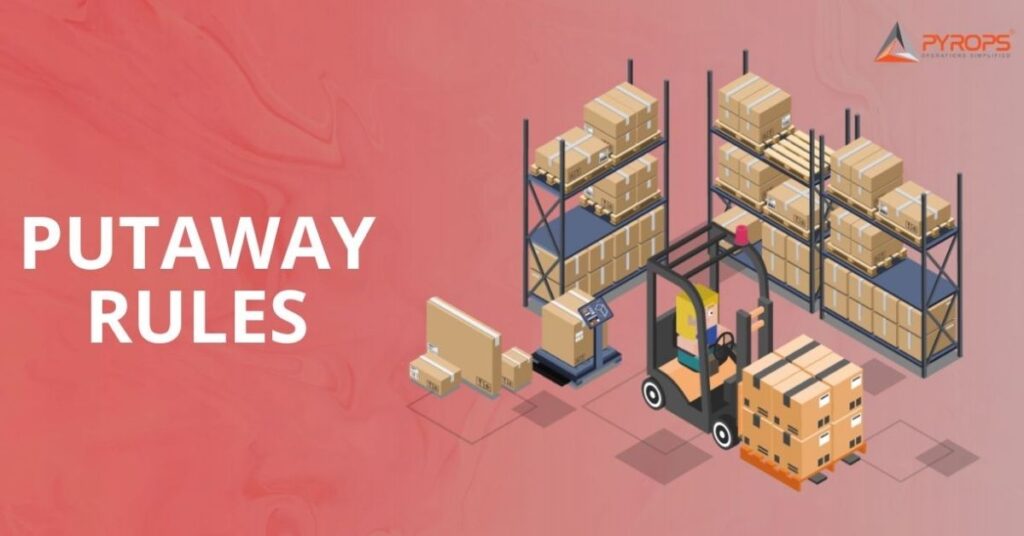
Put away in warehouse is a crucial aspect of warehouse management, which involves several processes starting with warehouse receiving and ending with ensuring that inventory is stored in the right warehouse locations such as racks, shelves etc.  Put away is a rule-based system of moving items from a received shipment to the right places in warehouses. The initial placement of goods has a direct impact on all subsequent warehouse processes, especially the picking process. With a strategic warehouse put away system in place, it becomes so much more efficient and straightforward to store inventory without misplacing any SKUs. This process also improves warehouse tidiness and makes it easier for pickers to find the right SKU quickly. Putaway process in warehouse that determines how efficiently your inventory is stocked and accessible. When done correctly, putaway in warehouse management can minimize the time and effort needed to find and retrieve products. However, when done poorly, it can lead to confusion, lost time, and even safety hazards for warehouse managers and staff. Here, we will provide information on what is putaway meaning, the different putaway methods, and how you can optimize your own Warehouse Putaway process using WMS software. Objectives of Put Away The prime objective of the put-away process is to move goods from the dock to the most optimal warehouse storage location. Other objectives include Types of Put away The putaway process is a critical part of warehouse management. Putaway in WMS involves storing incoming products in the most efficient and accurate way possible. A well-implemented put away warehouse can help businesses to reduce stockouts, improve order fulfillment times, and reduce inventory costs.Many steps are followed to implement warehouse putaway using different methods. Depending on the criteria such as type of materials, physical weights of materials, quantity, size of warehouses and other unique features of the business, there are four different types of warehouse put away as shown- Put away based on space availability Depending on available storage space, i.e., whether items had to be put away to final locations immediately or later, there are two categorizations. Direct Put away Indirect Put away Using indirect put away gives more control and precision when sending items to their correct locations in warehouses. For the large drums to be placed over floor markings, indirect put-away is used. When the large drums arrive at the docking station, they are brought down with forklifts and stored at a temporary area. After finding ideal spots for these drums, workers move the drums to marked locations and not racks or bins since each drum is huge. Indirect out away is used in more locations with huge warehouses meaning it is hard to locate where to put away. Put away based on location rules Fixed Location Put away Dynamic Location Put away Put away process in warehouse: Optimization Is Key Every warehouse has its own putaway process, but without proper optimization, it is difficult to achieve the best results. A warehouse management system (WMS) can help businesses to optimize their putaway process and get the most out of it. Advantages of Put away Reduces the chance of lost or misplaced items Improve the picking process Effective use of storage space Pyrops WMS: The key to efficient & accurate putaway Pyrops WMS software is a powerful and easy-to-use warehouse management system that can help businesses of all sizes to optimize their putaway process. With Pyrops WMS, businesses can improve efficiency, accuracy, and visibility, while also reducing costs and improving customer satisfaction.

Pyrops® WMS is a warehouse management software designed, developed, and implemented by Precision Pyramid Private Limited.

For more info visit: www.precisionpyramid.com

India Head Office

A-1, Forest Lane, Near Ghitorni Metro Station, MG Road, Sultanpur, New Delhi – 110030

Nepal Corporate Office

Precision Pyramid Nepal Private Limited 6th Floor, Radha Bhawan, Tripureshwar, Kathmandu, Nepal

Contacts

Follow us

Scroll to Top